Change your Admin Email Address
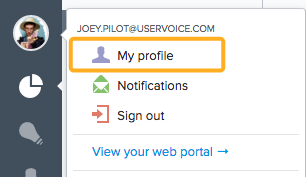
- Click the avatar icon in the bottom left corner
- Choose "My Profile settings" from the menu.
- You'll see the option to change your email address. This is the email address you use to log into your HelpDesk and the one we send notifications to.
If you get a warning that your "Email is Taken" when trying to change the address, this article will walk you through how to fix it.
Update your Job Title
This can be changed in the "My profile" settings when you click the "Avatar" icon.
Change the language of the admin console
Each admin can set the language of the admin console for their profile (so if you change your admin console language, it won't affect other admins).
- Click the icon in the bottom left corner
- Choose "My Profile settings" from the menu
- Click the language menu to choose a different language for your view of the admin console
If you don't see your language listed, this means we don't yet have a completed translation for it.
All our translations are maintained by our community. You can submit translations on our translation portal at http://translate.uservoice.com (you can also submit corrected translations there).
How do I edit which notifications I receive?
A: Click your avatar -> Choose "Notifications" in the drop-down menu. You'll be able to edit your basic notification settings.
A: Click your avatar -> Choose "Notifications" in the drop-down menu. You'll be able to edit your basic notification settings.